Last week, I was in a discussion where three smart people used the word
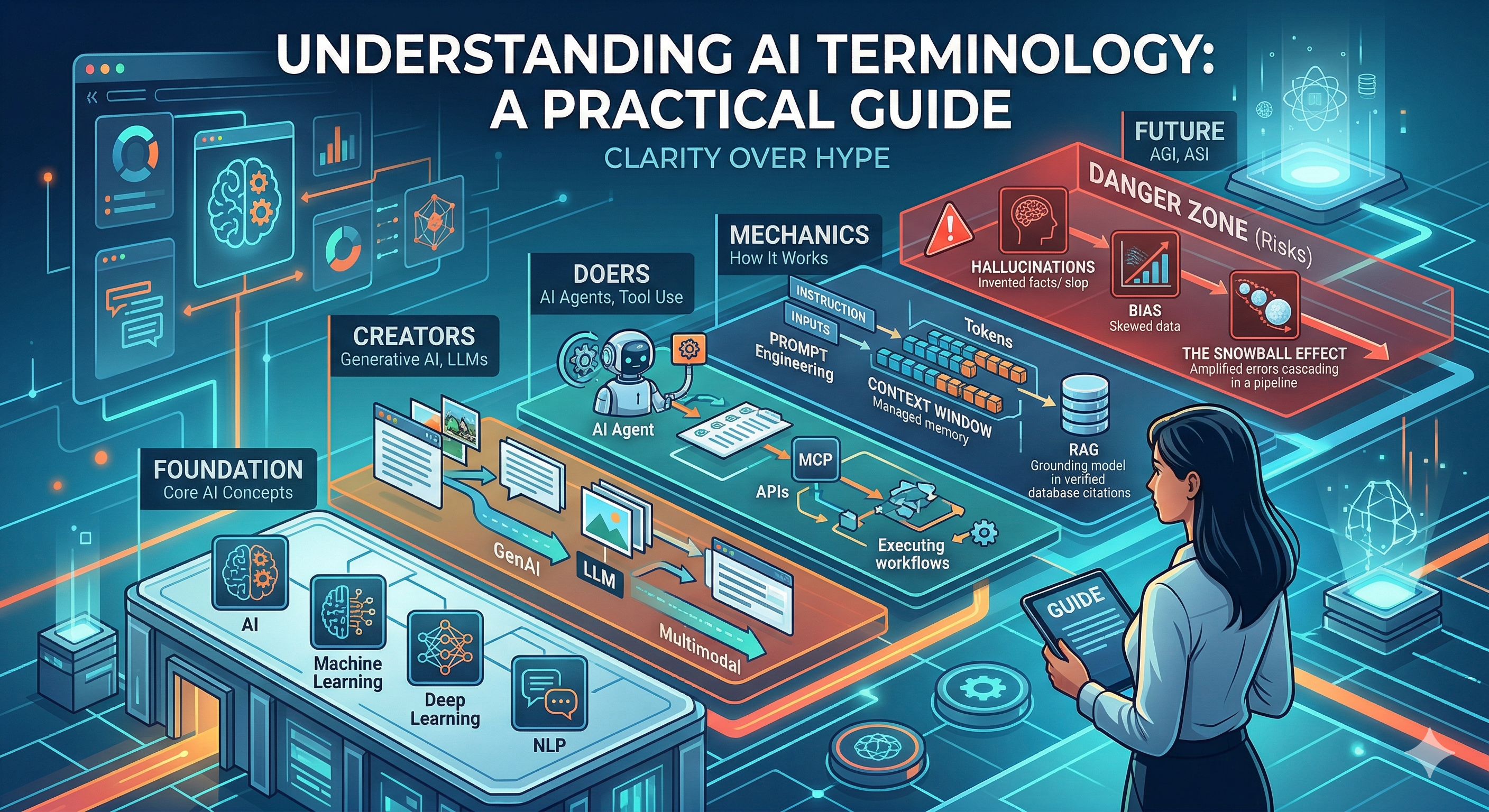 This is my attempt to sort the vocabulary out the way I would put in front of an engineering leadership team: no
hype, no vendor fog, just what each term means and what it changes in a real system.
This is my attempt to sort the vocabulary out the way I would put in front of an engineering leadership team: no
hype, no vendor fog, just what each term means and what it changes in a real system.
agent three different ways
in the first ten minutes. Nobody was confused because they were unprepared — they were confused because the industry keeps
collapsing very different ideas into the same handful of words.
That is the real problem right now. AI is moving faster than most organizations/engineers can absorb, and terms
that used to belong in research papers are now showing up in delivery plans, budget decks, and production architecture
reviews.
Source: Gemini 3
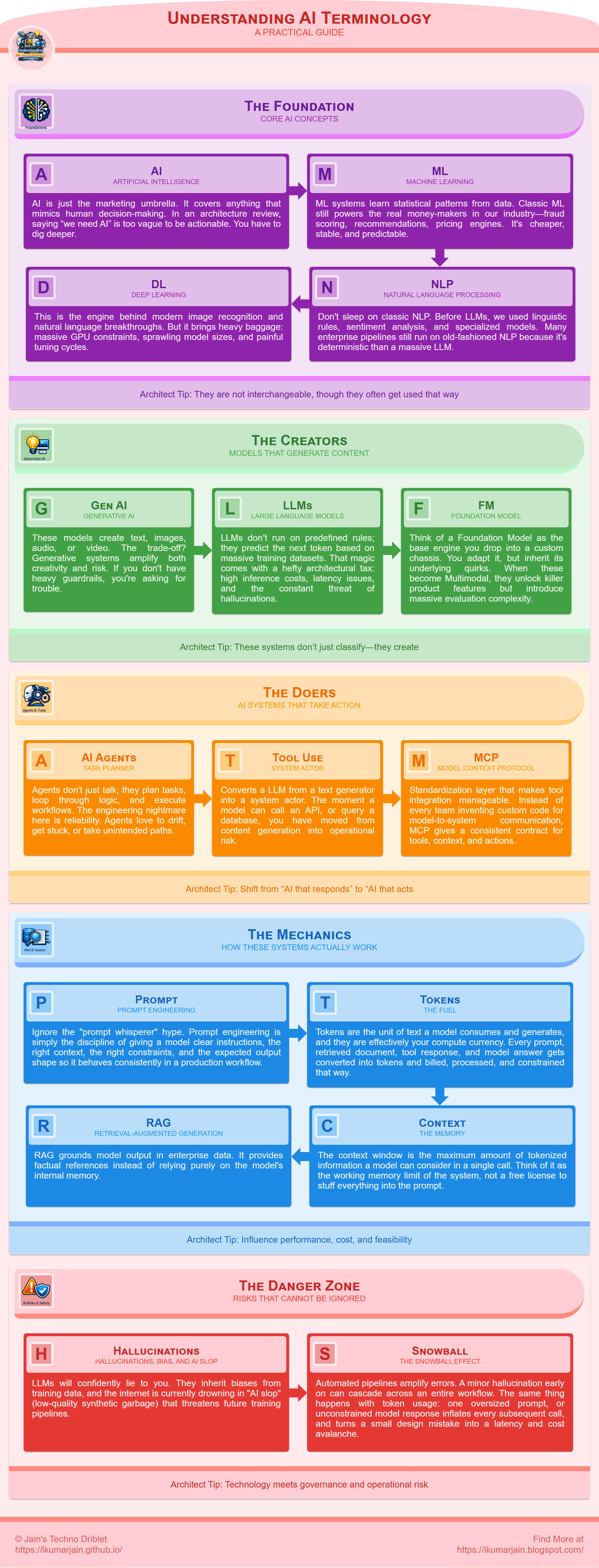
The Foundation: Core AI Concepts
These terms establish the baseline for understanding modern systems. They are not interchangeable, though
they often get used that way.
Artificial Intelligence (AI)
AI is just the marketing umbrella. It covers anything that mimics human decision-making. In an architecture review, saying we need AI is too vague to be actionable. You have to dig deeper.Real-World Scenario: The moment I hear we need AI, or
we should use AI here,
I ask for specifics like: what do you mean by we need AI? Do you mean scoring, ranking, extraction,
summarization, or an agent that is going to touch production systems? I have seen this confusion cost
teams significant time and resources.
We lost almost two weeks on one initiative because product kept saying AI while engineering was
imagining three different
solutions which are far from product expectations.
Architect Tip: Convert every we need AI ask into a specific system
choice,
measurable KPI, and target operating cost before planning.
Machine Learning (ML)
ML systems learn statistical patterns from data. Classic ML still powers the real money-makers in our industry—fraud scoring, recommendations, pricing engines. It's cheaper, stable, and predictable.Real-World Scenario: I have seen teams lose managed endpoints from a
few mid-size accounts and struggle to explain why. The flashy proposal was an AI layer over account
notes, but they got faster results with a simple churn-risk model built from ticket frequency, SLA
breach trends, unresolved alerts, and technician handoff count. It quickly highlighted accounts
drifting toward contract risk, and CS/Ops could act earlier without adding a heavy AI stack.
Architect Tip: Start with a baseline model and only escalate to complex AI if
baseline metrics fail your business threshold.
Deep Learning
This is the engine behind modern image recognition and natural language breakthroughs. But it brings heavy baggage: massive GPU constraints, sprawling model sizes, and painful tuning cycles.Real-World Scenario: I have seen teams deploy deep-learning models
for document understanding when incoming files are messy scans, photos, and mixed layouts that rules
cannot handle reliably. In the first phase, extraction quality jumps and downstream manual cleanup drops
fast. The trouble starts at scale: model retraining becomes frequent as document formats drift,
inference
latency stretches batch windows, and GPU spend creeps up every quarter. The rollout succeeds only when
they keep it focused on high-volume, high-error document types where the quality gains clearly outweigh
the model and infrastructure overhead.
Architect Tip: Run a hardware and latency feasibility spike early, then approve deep
learning only if ROI survives infra costs.
Natural Language Processing (NLP)
Don't sleep on classic NLP. Before LLMs, we used linguistic rules, sentiment analysis, and specialized models. Many enterprise pipelines still run on good old-fashioned NLP because it's deterministic and vastly easier to govern than a massive LLM.Real-World Scenario: In one recent rollout, a team ran a simple intent
classifier
with keyword rules to triage inbound support tickets before an agent ever reads them. Messages with
terms like "outage," "can't log in," or "billing error" get routed to the right queue in seconds, while
low-priority requests are batched automatically. It is not flashy, but it is fast, predictable, and
cheap to operate at scale.
Architect Tip: Use deterministic NLP first for routing and compliance-sensitive
flows where predictability beats creativity.
The Creators: Models That Generate Content
These systems don’t just classify—they create.
Generative AI
These models create text, images, audio, or video. The trade-off? Generative systems amplify both creativity and risk. If you don't have heavy guardrails, you're asking for trouble.Real-World Scenario: A classic failure mode happened when a team used
Generative AI to draft
first-pass release notes from sprint tickets and pull requests. Delivery managers loved the speed, but
the first unreviewed drafts occasionally invented dependencies that were never shipped. The process only
stabilized after they treated the model as a drafting assistant, enforced template constraints, and
required a human owner to approve every public update.
Architect Tip: For customer-facing output, enforce human approval gates and policy
filters as a non-negotiable release condition.
Large Language Models (LLMs)
LLMs don’t run on predefined rules; they predict the next token based on massive training datasets. That magic comes with a hefty architectural tax: high inference costs, latency issues, and the constant threat of hallucinations.Real-World Scenario: Consider a workflow where an LLM summarizes noisy
endpoint incidents across alerts, technician notes, and ticket history before handoff between shifts.
The summaries save real time, but once volume ramps up, edge cases show up fast: occasional invented
root causes, provider timeouts during peak windows, and JSON responses that break downstream parsers.
The feature is still valuable, but only after teams treat the LLM like an external production dependency
with retries, schema checks, and clear fallback behavior.
Architect Tip: Treat LLM APIs like unstable infrastructure dependencies: add
retries, fallbacks, schema validation, and circuit breakers.
Foundation & Multimodal Models
Think of a Foundation Model as the base engine you drop into your custom chassis. You adapt it, but you inherit its underlying quirks. When these models become Multimodal (handling text, images, and audio at once), they unlock killer product features but introduce massive evaluation complexity.Real-World Scenario: One team I advised prototyped a multimodal
workflow
where technicians submit a photo, a short voice note, and a text description to speed up incident
triage. In demos, it feels magical because the model can correlate all three inputs and suggest likely
causes quickly. In production, the hard part is not the demo prompt; it is evaluating edge cases across
every modality at once: blurry images, noisy audio, incomplete text, and conflicting signals between
channels. The teams that succeed treat multimodal rollout as an evaluation problem first, not a UI
problem first.
Architect Tip: Evaluate each modality independently with production-like test sets
before trusting the full multimodal workflow.
The Doers: AI Systems That Take Action
This category represents the shift from AI that responds to AI that acts.
AI Agents
Agents don't just talk; they plan tasks, loop through logic, and execute workflows. The engineering nightmare here is reliability. Agents love to drift, get stuck, or take unintended paths.Real-World Scenario: Take the example of a multi-agent patch
workflow with one agent planning rollout waves, a second agent validating device readiness, and a third
agent handling rollback decisions. In test environments, the flow looked efficient because each agent
stayed in its lane. In live operations, timing drift between agents created race conditions, and the
rollback agent occasionally acted on stale state from the previous step. The setup only stabilized once
teams added state version checks, per-step approvals for risky actions, and a global kill switch that
halted the whole chain when confidence dropped.
Architect Tip: Ship agent workflows with max-step limits, per-action quotas, and a
one-click kill switch from day one.
Tool Use
Tool use is what converts an LLM from a text generator into a system actor. The moment a model can call an API, query a database, or trigger a workflow, you have moved from content generation into operational risk.Real-World Scenario: In another instance, engineers wired an LLM
assistant to a
remote-execution tool so they could run routine maintenance from chat. It felt great in the first
week because simple fixes became one command. Then a poorly scoped parameter template let the assistant
target a broader device group than intended, and a low-risk cleanup script ran against production nodes.
Nothing catastrophic happened, but that near miss was enough to pause the rollout and rebuild tool
permissions, approval gates, and execution boundaries properly.
Architect Tip: Treat every tool as a production integration surface with
least-privilege access, audit logs, and scoped failure boundaries.
Model Context Protocol (MCP)
MCP is the standardization layer that makes tool integration manageable. Instead of every team inventing custom glue code for model-to-system communication, MCP gives you a consistent contract for exposing tools, context, and actions.Real-World Scenario: I recently reviewed an architecture where teams
standardized agent tool access
through an MCP-style layer so each tool exposed the same schema, auth model, and error contract.
Integration velocity improved immediately because new teams could plug in without reverse-engineering
bespoke payloads. The real win showed up later: when a backend service changed, only the MCP adapter
needed updates instead of every consuming workflow. That is the difference between one controlled
migration and five emergency hotfixes.
Architect Tip: Standardize early on MCP or an equivalent contract layer, or you will
accumulate brittle, duplicated integration logic across teams.
The Mechanics: How These Systems Actually Work
These terms influence performance, cost, and feasibility.
Prompt Engineering
Ignore the prompt whisperer hype. Prompt engineering is simply the discipline of giving a model clear instructions, the right context, the right constraints, and the expected output shape so it behaves consistently in a production workflow. For engineering leaders, this is not about clever wording. It is about reducing ambiguity, controlling failure modes, and making model behavior predictable enough to support testing, compliance, and downstream automation.Real-World Scenario: It is common to see teams craft careful prompts
for
alert summarization — specific output format, priority-ranking instruction, and explicit field
constraints. The workflow ran cleanly for weeks until a new alert source arrived with a different field
schema. The prompt received unexpected fields it was never told how to handle, filled the output with
verbose uncertainty disclaimers, and the on-call queue flooded with low-confidence summaries drowning
out the high-confidence ones. The fix was two hours of prompt work: an input normalization step and an
explicit instruction for handling unknown fields. That is what prompt engineering actually looks like in
production — not writing the first prompt, but knowing what will break it.
Architect Tip: Version prompts like code, and gate deployments with automated
output-format and regression tests.
Tokens
Tokens are the unit of text a model consumes and generates, and they are effectively your compute currency. Every prompt, retrieved document, tool response, and model answer gets converted into tokens and billed, processed, and constrained that way. For engineering leaders, this matters because token volume directly affects latency, cost, and how much information your system can safely carry per request.Input Tokens
Input tokens are everything you send into the model: the system prompt, user prompt, chat history, retrieved context, examples, and tool outputs. This is where costs usually start to creep up because teams keep adding more instructions and more data in the hope of getting better answers. In practice, oversized inputs often create slower, more expensive requests without improving quality in proportion.Output Tokens
Output tokens are everything the model sends back: the answer, structured JSON, tool arguments, summaries, explanations, or follow-up text. These matter just as much as input tokens. A verbose model response increases latency, raises cost, and can overload downstream systems that expect a concise, structured payload instead of an essay.Real-World Scenario: In one expensive misstep, a team built an agent
diagnostic assistant where every request carried the full patch policy library, the entire alert
history for the managed device, and verbose tool outputs from previous remediation steps — regardless
of whether the current question had anything to do with any of it. Engineers assumed richer context
meant better answers. In practice, the model was processing thousands of tokens of patch history to
answer a simple connectivity question. Median response time climbed as the managed device count grew,
and the per-request cost made fleet-wide rollout a budget conversation nobody wanted to have. The fix
was targeted retrieval: inject only the patch entries relevant to the current alert category, cap tool
output summaries at a fixed token budget, and avoid resending history the model had already acted on.
Response time dropped, cost scaled linearly with devices rather than exponentially, and answer quality
held. Token discipline is not optional — every device in a large fleet multiplies the
inefficiency.
Architect Tip: Budget input tokens and output tokens separately in design reviews,
because oversized prompts create hidden infrastructure cost while oversized responses degrade latency
and downstream usability.
Context Windows
The context window is the maximum amount of tokenized information a model can consider in a single call. Think of it as the working memory limit of the system, not a free license to stuff everything into the prompt. As you fill the window with instructions, history, retrieved content, and tool results, performance gets more expensive and often less reliable. Large context can be useful, but unmanaged context leads to slow responses, noisy reasoning, and runaway cost.Real-World Scenario: Consider an AI code review assistant wired into a
CI pipeline
that receives the full PR diff, the complete test output, all previous
inline review comments, and the linting report — everything in one context window per run. It worked
acceptably on small PRs. On large ones, a senior engineer noticed the assistant consistently flagged
issues near the bottom of files but missed obvious problems at the top. The content was technically
within the token limit, but the relevant code had drifted into the region where transformer attention
weakens on long inputs — the classic lost-in-the-middle problem. The fix was not a larger model; it
was a smarter context strategy: per-file review passes with focused context slices, then a final
aggregation step. Coverage improved and latency dropped because each call carried only what was
needed. A large context window is a ceiling, not a target.
Architect Tip: Use context windows intentionally: retrieve only what is relevant,
summarize aggressively, and treat unused context as waste, not safety.
RAG (Retrieval-Augmented Generation)
RAG grounds model output in enterprise data. It provides factual references instead of relying purely on the model's internal memory.Real-World Scenario: In a recent deployment of an internal compliance
assistant,
engineers could ask questions about security policies, audit requirements,
and approved vendor lists. Without RAG, answers came entirely from the model's training data — which
meant responses were confidently worded but silently out of date. Nobody caught it until an engineer
followed guidance that contradicted a policy updated three months earlier. The incident did not require
a postmortem to understand: the model had no access to current documents, so it invented plausible
answers from stale knowledge. After rebuilding with retrieval against the live policy repository, every
answer included a source reference and a document timestamp. Engineers stopped trusting the tone of
the answer and started checking the citation date instead. That shift in user behavior — from trusting
confidence to verifying provenance — is exactly what a well-designed RAG system should produce.
Architect Tip: Require citations in every answer and log retrieved context for
auditability and legal defensibility.
The Danger Zone: Risks That Cannot Be Ignored
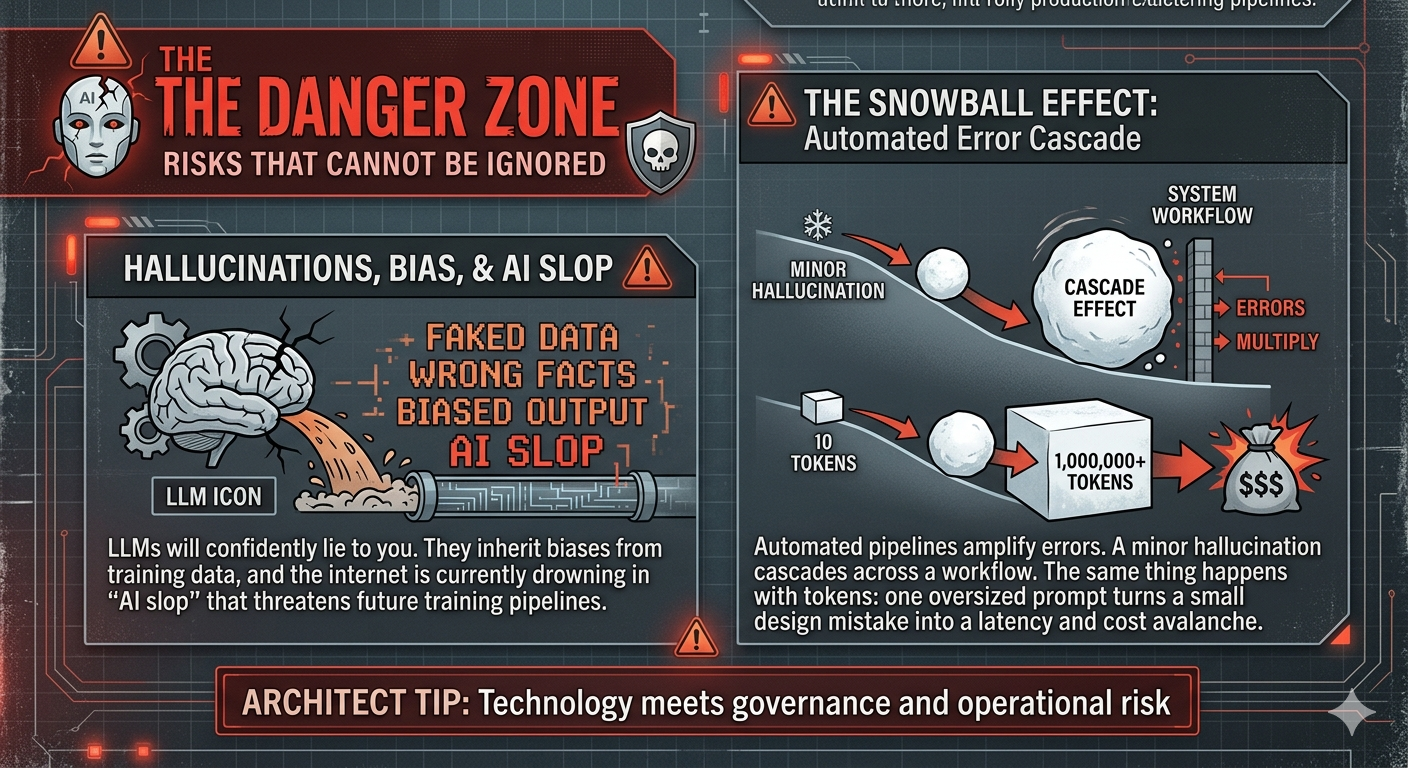
Source: Gemini 3
Where technology meets governance and operational risk.
Hallucinations, Bias, and AI Slop
LLMs will confidently lie to you. They inherit biases from training data, and the internet is currently drowning in "AI slop" (low-quality synthetic garbage) that threatens future training pipelines.Real-World Scenario: A stark reminder of this risk occurred when a
team used an LLM to draft
detailed incident postmortems, including root cause analysis, timeline reconstruction, and remediation
steps. The output was fluent and well-structured, so engineers reviewed it quickly and signed off.
Weeks later, during an audit, someone cross-referenced the postmortem against the actual incident
logs. The model had invented specific log lines, ticket numbers, and timestamps that did not exist.
None of the fabricated details were caught during review because the surrounding narrative was
coherent and the tone was authoritative. The hallucinations were not wrong answers to direct questions
— they were invented supporting evidence woven into plausible prose. The team added a mandatory
verification step: every cited artifact in an AI-drafted postmortem must be traceable to a real source
before sign-off. Fluency is not accuracy, and confident structure is not a substitute for verified
facts.
Architect Tip: Build a recurring red-team and bias test suite, and block release
when fairness or factuality thresholds fail.
The Snowball Effect
Automated pipelines amplify errors. A minor hallucination early on can cascade across an entire workflow. The same thing happens with token usage: one oversized prompt, one verbose tool result, or one unconstrained model response gets passed downstream, inflates every subsequent call, and turns a small design mistake into a latency and cost avalanche.Real-World Scenario: Consider an automated ticket triage pipeline
where a misconfigured prompt
caused the classifier to assign Severity 1 to any ticket
containing the word urgent — including messages like not urgent, just checking in. A Sev-1
classification was the first step in a fully automated chain: on-call page, account manager
escalation email, SLA clock start, and an automated first-response assuring the customer a senior
engineer was engaged. By the time a human looked at the ticket, three teams had been paged, an
apology email had been sent, and the SLA dashboard showed a breach — all triggered by a routine
inquiry. The classifier did exactly what it was configured to do. The problem was that nothing in the
pipeline checked confidence before passing the classification downstream. A single brittle model
decision, amplified by five automated handoffs, turned a misconfiguration into an operational
incident. That is the snowball effect: the error did not get caught; it got multiplied.
Architect Tip: Insert confidence checks, token caps, and human review points at
critical hops so bad outputs and bloated context cannot cascade downstream.
The Future: Where This Is All Heading
AGI & ASI (Artificial General & Super Intelligence)
These terms refer to systems that match or exceed human-level reasoning across all domains.Real-World Scenario: I have not seen a production program where AGI
assumptions were the real constraint. In practice, engineering teams still design around current model
SLAs, reliability limits, and budget realities. AGI conversations are fine for strategy, but delivery
plans still live in today's constraints.
Architect Tip: Keep strategy tied to current model SLAs, capabilities, and costs,
not speculative timelines.
Final Thought
Ultimately, understanding these terms isn’t about winning pedantic arguments over vocabulary—it’s about
architectural clarity. Misusing this terminology in a planning meeting leads directly to misaligned
expectations, over-engineered systems, and blown budgets.
When engineering leaders ground their understanding in precise, technical realities, they stop chasing the
hype. They start making better tradeoffs. The real job is not to sound current in a meeting. It is to choose
the right tool for the problem, put sane guardrails around it, and avoid creating an expensive mess the
platform team has to clean up six months later.
Clarity over hype, systems over slogans, outcomes over demos.
Understanding AI Terminology Driblet
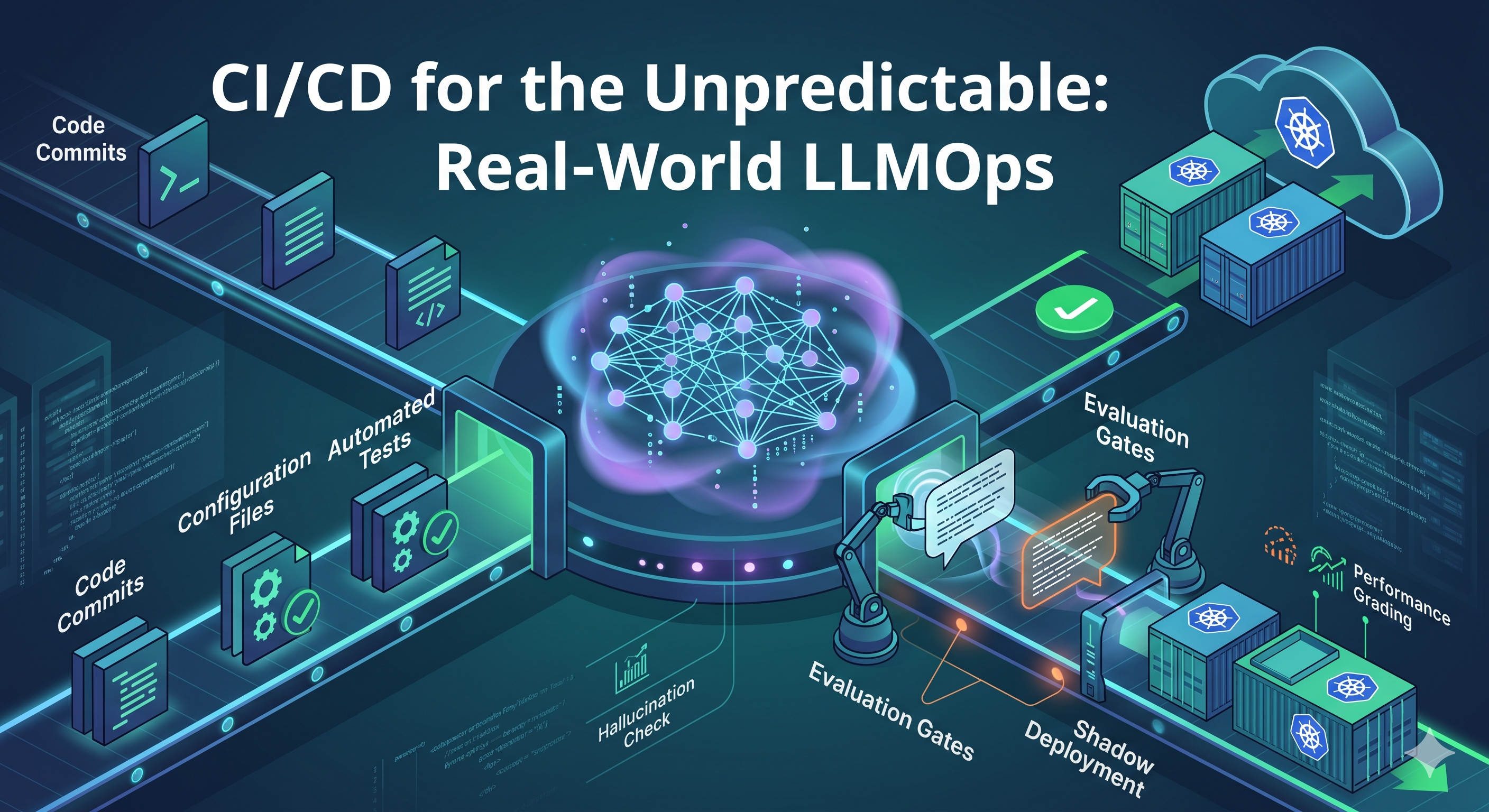 CI/CD for the Unpredictable: Real-World LLMOps
Post a Comment
Post a Comment