Recently, we ran into a severe performance bottleneck during object manipulation. Profiling the database
calls revealed something terrifying: when adding a single item to a Many-to-Many collection,
Hibernate was executing a
DELETE statement wiping out every entry in the join
table for that entity, followed by a flurry of INSERT statements to write everything back —
plus the new item.
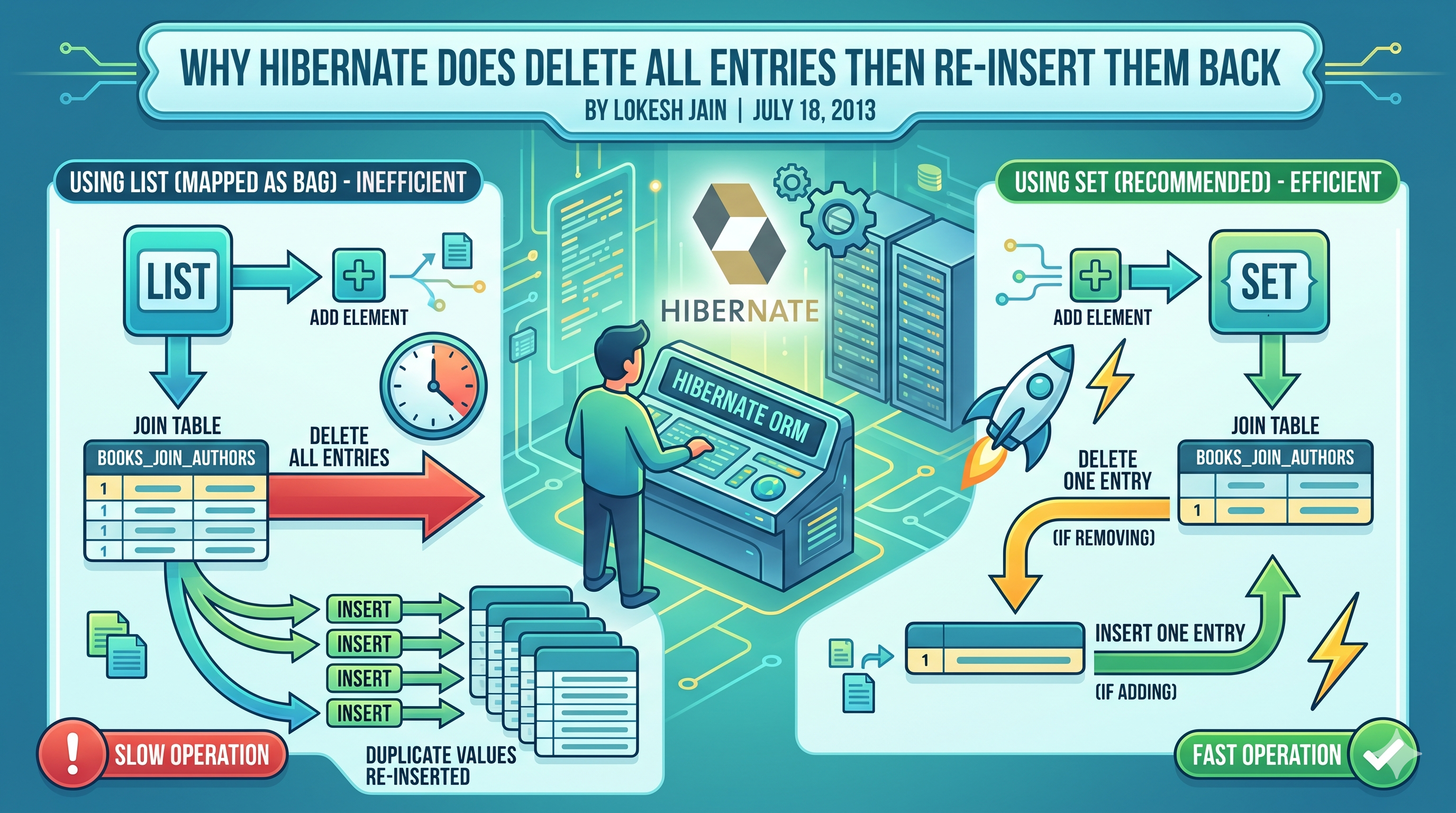
If you have 1,000 items in the collection and add one, Hibernate deletes 1,000 rows and inserts 1,001.
The Root Cause: The Unindexed List
This anomaly occurs when you map a
@ManyToMany or a @OneToMany (backed by a join
table) using a java.util.List without explicitly defining an index column.
Under the hood, if there is no index column, Hibernate treats the
List as a
Bag. A Bag is an unordered collection that allows non-unique values. Because it doesn't
track order and allows duplicates, Hibernate has no primary key or index to uniquely identify a specific
row in the join table.
When you modify the collection, Hibernate cannot safely issue a targeted
DELETE or
INSERT. To guarantee the database state matches your in-memory Java object, it resorts to the
nuclear option: drop all associations and recreate them from scratch.
The Fix
You have two architectural choices to resolve this, depending on your domain constraints.
The Problematic Code (The Trap)
The Problematic Code
Solution 1: Use a Set (Recommended)
If your domain logic does not require duplicate entries, simply change the collection to a
Set. Hibernate knows a Set has unique elements, allowing it to uniquely
identify rows and issue a single targeted INSERT or DELETE
statement.
Solution 1: Use a Set
Solution 2: Use an Indexed List
If the business logic dictates that you absolutely must maintain strict ordering and allow duplicates,
you must provide an index column. Adding
@OrderColumn gives Hibernate a physical column
in the database to track exactly which index was added or removed, preventing the table wipe.
Solution 2: Use an Indexed List
A quick tip on architecture: When designing your domain model, don't blindly default toListjust because it is familiar in Java. ORM collection semantics dictate database performance. If you need efficient manipulation of ordered items in Hibernate, an indexed column is strictly necessary. Better yet, challenge the business requirement: if duplicates aren't genuinely needed, always default to aSet.
Final Thought
When using a
List in Hibernate, an indexed column is necessary if you want
efficient manipulation of adding or deleting items. With an indexed column, Hibernate can relate the index
to the column in the database and issue only one targeted statement based on the operation.
If duplicates are not needed in your application,
Set is the better choice.
Set does not require an index column, and Hibernate can easily distinguish one row because
it knows a set does not have duplicates.
In Hibernate, treating a
List like a Set without telling the database is the
fastest way to turn a one-millisecond update into a database coffee break.
 CI/CD for the Unpredictable: Real-World LLMOps
2 Comments
Hello.
ReplyDeleteI found this article because same issue was happening to me. Well... not really an issue, but doubt about Hibernate behavior.
But, after some research and test-error research with a real Hibernate development environment, I have found out that what makes Hibernate to behave as explained in this article (delete-insertions aproach) is not the existence of indexed columns.
The following lines explain what I found.
It depends on which object is added to which.
Let's call object A the one that makes the addition and object B the one that is added.
I.E., in a generic way:
objectA.add(objectB);
If object A already exists in database, it somehow needs to delete all of the relations and re-insert the ones needed.
If object A is new, it will perform a clean insert in the database.
The existence or not of indexes in one or other columns didn't change Hibernate behavior in my tests. No matter what columns of the join table had the indexes, that Hibernate did exactly the same and responding only to what explained at the begining of this comment.
Open to further clarifications: pgbonino@gmail.com
Amazing explanation.....SOLVED.
ReplyDeletePost a Comment